
Securing a Generative AI Chatbot on AWS: Part 1 The Architecture, the Stack, and Getting It Running
A three-part series on GenAI app security: the stack, the threats, and the controls that actually work

‼️ This blog is part of a three-part series where we explore, attack, and secure a real generative AI chatbot application running on AWS.Generative AI is moving fast. Faster than most security teams can keep up with. A developer can spin up a chatbot connected to a language model in an afternoon, wire it to a company database, and ship it to users before anyone in security has had a chance to ask: “what could go wrong here?”
This series answers that question practically. We will look at a real GenAI application architecture, walk through how it gets attacked, and show the AWS security controls that can stop it. By the end of the series, you will understand how to assess a GenAI app for common vulnerabilities, how to implement guardrails that actually work, and how to monitor your controls over time.
Let’s start at the beginning.
The scenario: a chatbot with access to sensitive data
Picture a small doctors’ office. Two staff members: a receptionist and a doctor. Both stretched thin, both drowning in admin. A GenAI chatbot gets deployed to help - answering patient queries, surfacing information faster, reducing the back-and-forth. And nobody stopped to think about what happens when someone tries to break it.
This is not a hypothetical. It is the kind of architecture being deployed across healthcare, legal, and professional services right now. Small organisations, real use cases, chatbots built to be useful - not secure.
What does the architecture look like?
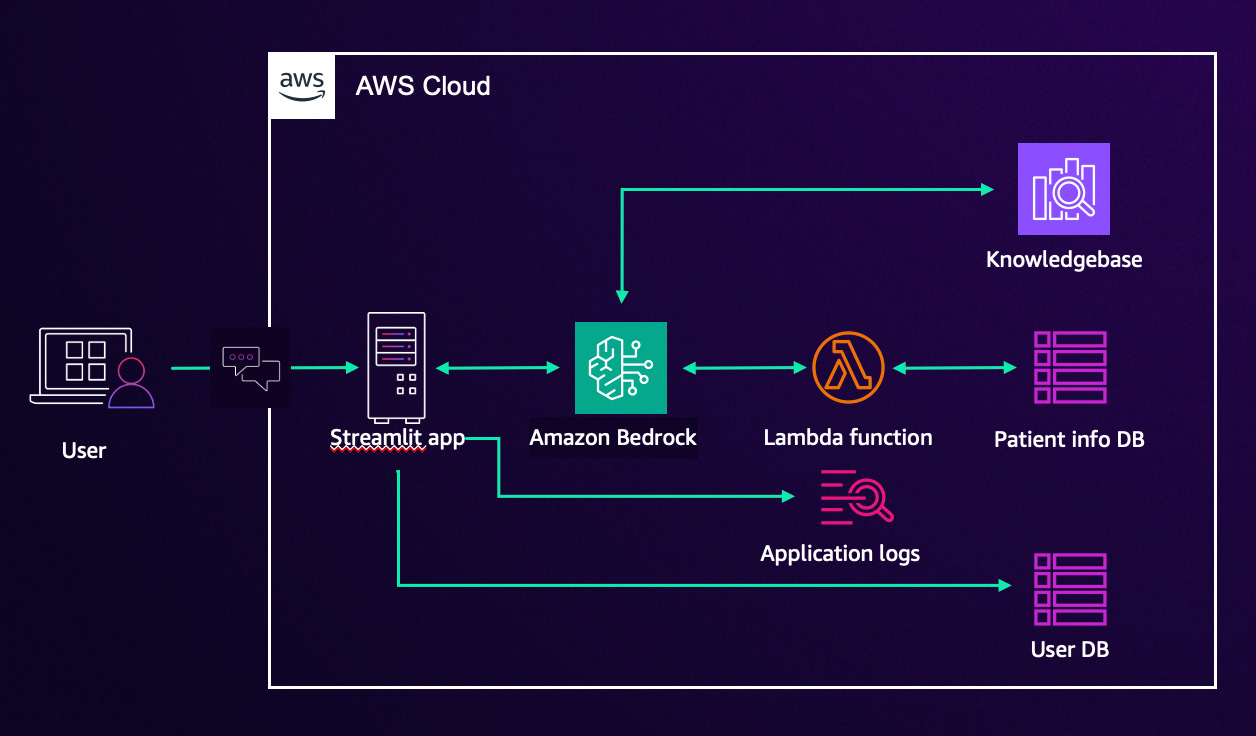
The application has six moving parts and it is worth understanding what each one does before we start pulling it apart.
The Streamlit app: is the front door. It is the web interface that users interact with the chat window where messages get typed and responses come back. Think of it like the reception desk. Everything passes through here.
Behind that sits Amazon Bedrock: which is AWS’s managed service for running large language models (LLMs). Rather than building or hosting their own AI model, the application uses Bedrock to access a foundation model via API. The chatbot sends a message, Bedrock processes it using the model, and sends a response back. The “intelligence” of the chatbot lives here.
AWS Lambda is a serverless function: a piece of code that runs on demand without needing a permanent server. In this application, Lambda sits between Bedrock and the databases, handling requests like “look up this patient’s information” or “check what appointments are available.” It is the middleman that fetches real data and hands it back to the model.
The Knowledgebase: is a structured store of information the chatbot can query using Amazon Bedrock Agents think of it as the filing cabinet the chatbot searches when someone asks a general question. Clinical guidance, FAQs, or office policies might live here. The knowledge base stores generic medical information such as medical journals, disease information, as well as information specific to the doctor’s office, such as appointments and cancellation policies.
Under the hood: Amazon Bedrock Agents allow the LLM to take actions, not just generate text. An agent can call Lambda functions, query knowledge bases, and chain multiple steps together to fulfil a complex request. This is what makes the chatbot genuinely useful and what makes securing it significantly more complex than a traditional web app.Why does this setup create security problems?
A traditional web application has a fairly predictable attack surface. You know the inputs, you know the outputs, and you can validate both. A GenAI application is different. The input is natural language which means it is, by design, unpredictable. You cannot write a simple validation rule for “any sentence a human might type.”
That unpredictability is exactly what attackers exploit.
Prompt manipulation sometimes called prompt injection is the GenAI equivalent of SQL injection. Instead of injecting malicious code into a database query, an attacker injects instructions into a message sent to the language model. The goal is the same: make the system do something it was not supposed to do.
A receptionist uses the chatbot to look up appointment times. An attacker crafts a message designed to manipulate the model into ignoring its boundaries and returning records it should never surface. No specialist tools required. Just words, sent through the same chat interface every legitimate user has access to.
Sensitive information disclosure is the second major risk. The chatbot has access to patient data. If the model is not properly constrained, it may return more than it should not because it was hacked in a traditional sense, but because it was asked cleverly. A poorly scoped system prompt combined with a connected database is a data breach waiting to happen.
What this series covers
Part 1 (this post) Architecture and setup
Part 2 Insecure plugins: how misconfigured integrations get exploited and how to fix them
Part 3 Prompt manipulation: testing and blocking prompt injection with Bedrock Guardrails
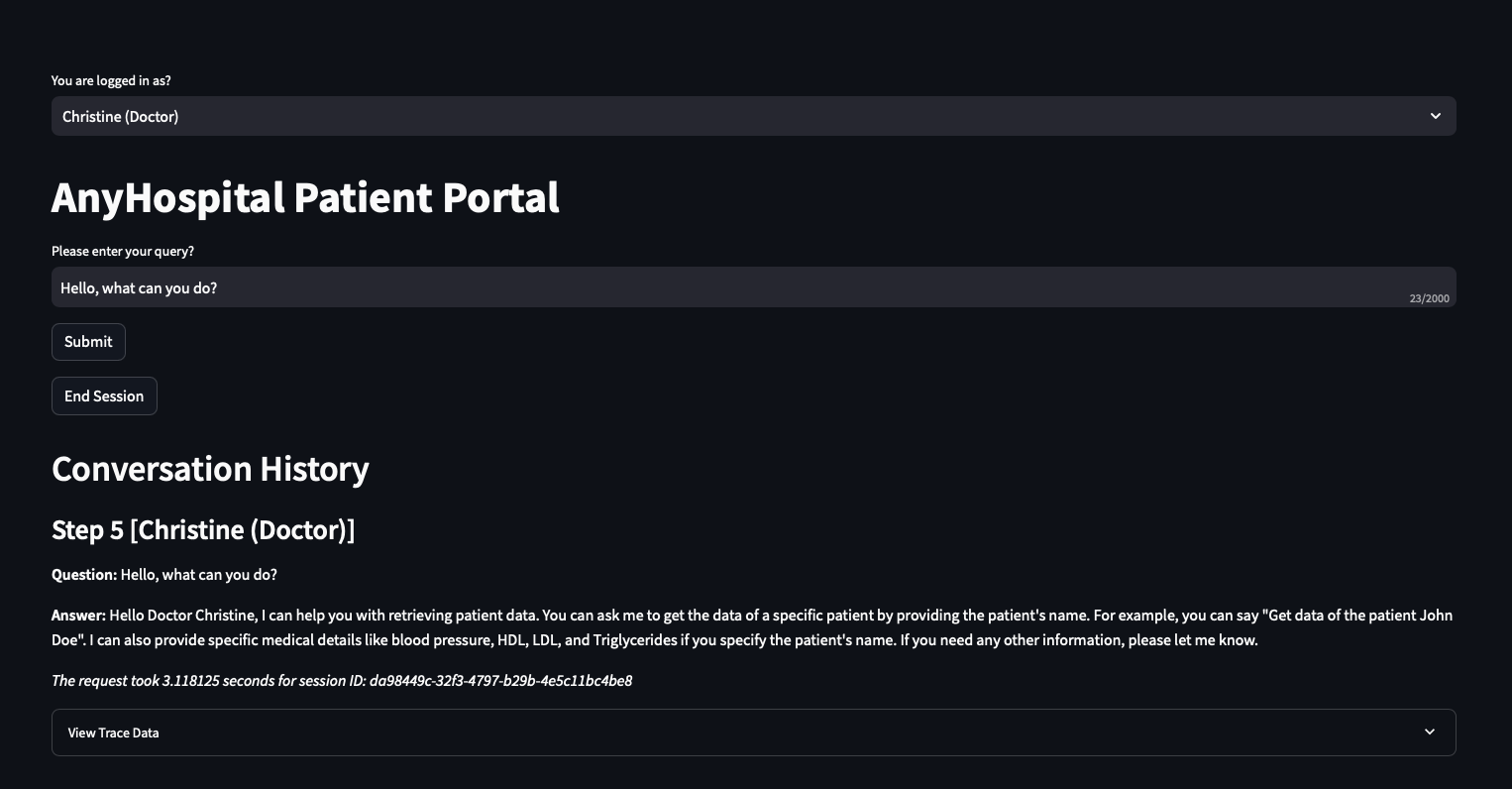
Doctor:
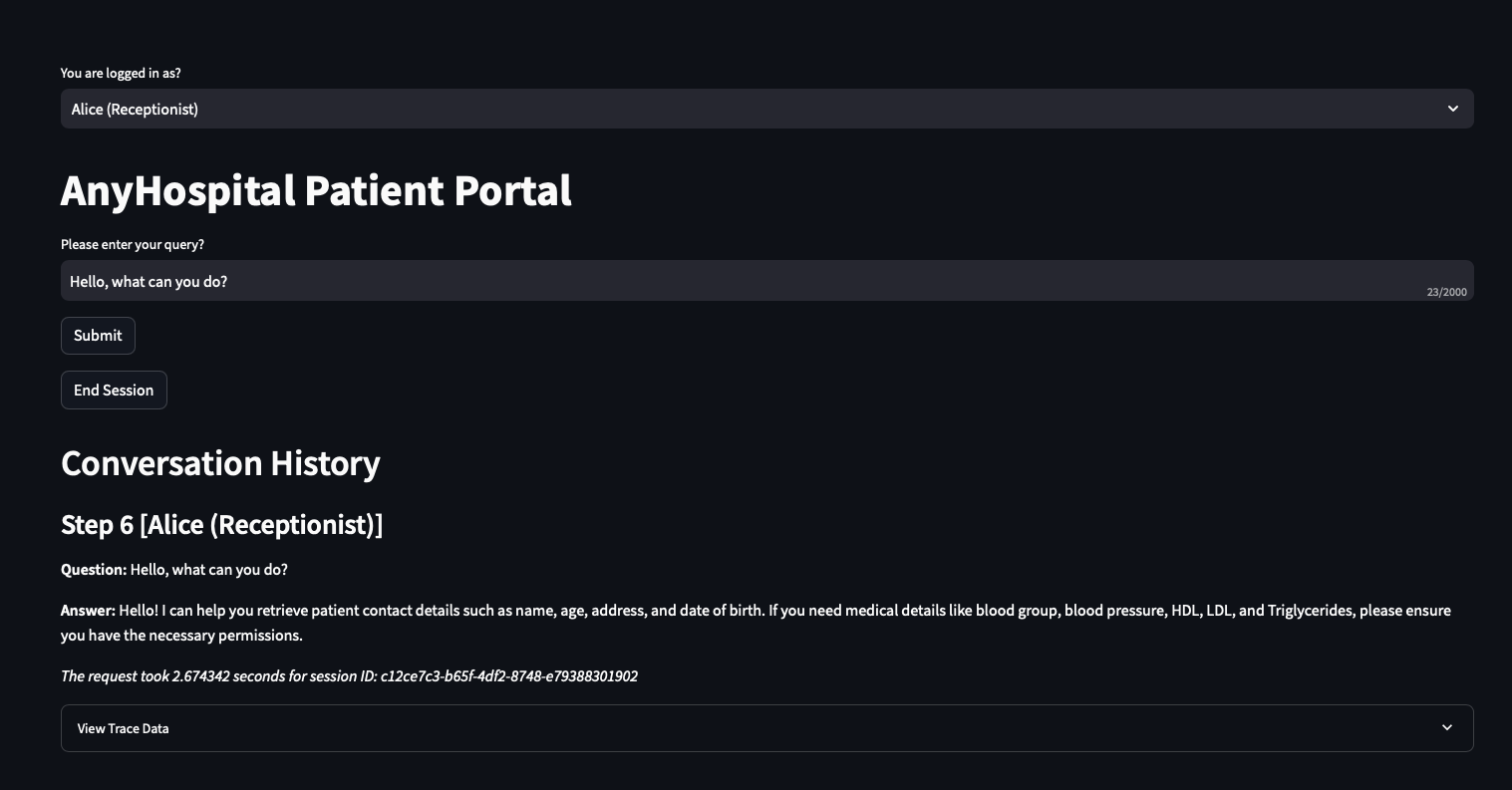
Receptionist:
Why the scenario is a doctors’ office
The small practice framing is deliberate. Two people, a basic chatbot, a couple of databases. It is easy to follow, and it strips away the enterprise complexity that often obscures the actual security problems.
But the risks are identical at scale. Any organisation connecting a language model to internal data, exposing it through a chat interface, and giving it the ability to take actions via APIs is running the same architecture at a different size. The attack surface scales. The threat categories do not change.
GenAI applications are being shipped faster than security controls are being designed for them. That gap is what this series is about.
Setting up the RAG DB
I already have sample RAG set up with dummy data.
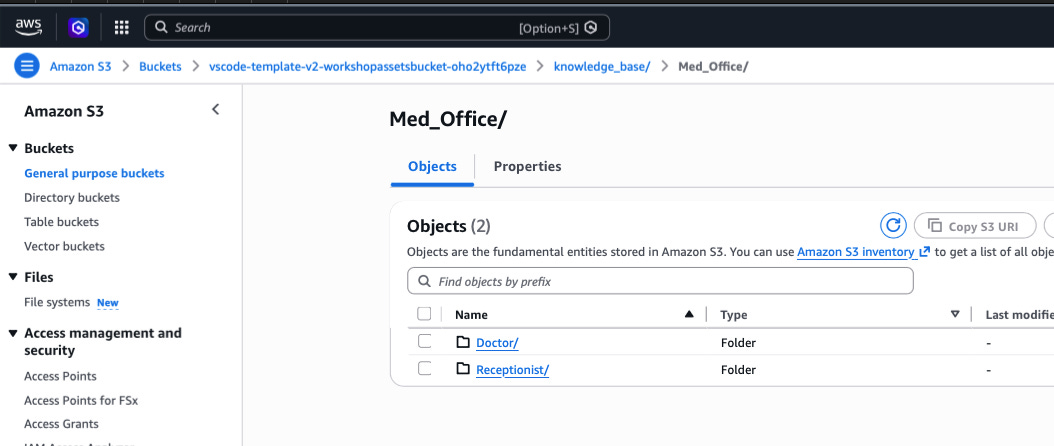
The sample dummy data is stored in an S3 bucket. Rather than retraining the model with new data (expensive, slow, impractical for most teams), Retrieval Augmented Generation (RAG) connects the model to a searchable knowledge store at query time. When a user asks a question, the system retrieves relevant content from that store and includes it in the prompt sent to the model. The model generates a response grounded in your actual data, not just its general training.
After syncing the data, I test the Knowledge Base to ensure I am getting the expected results based on the dummy data and that the results have been ingested into the RAG from S3. Select Test Knowledge Base from the top right of the console, choose Amazon Nova Pro as the model, and run a simple prompt: What services are available?
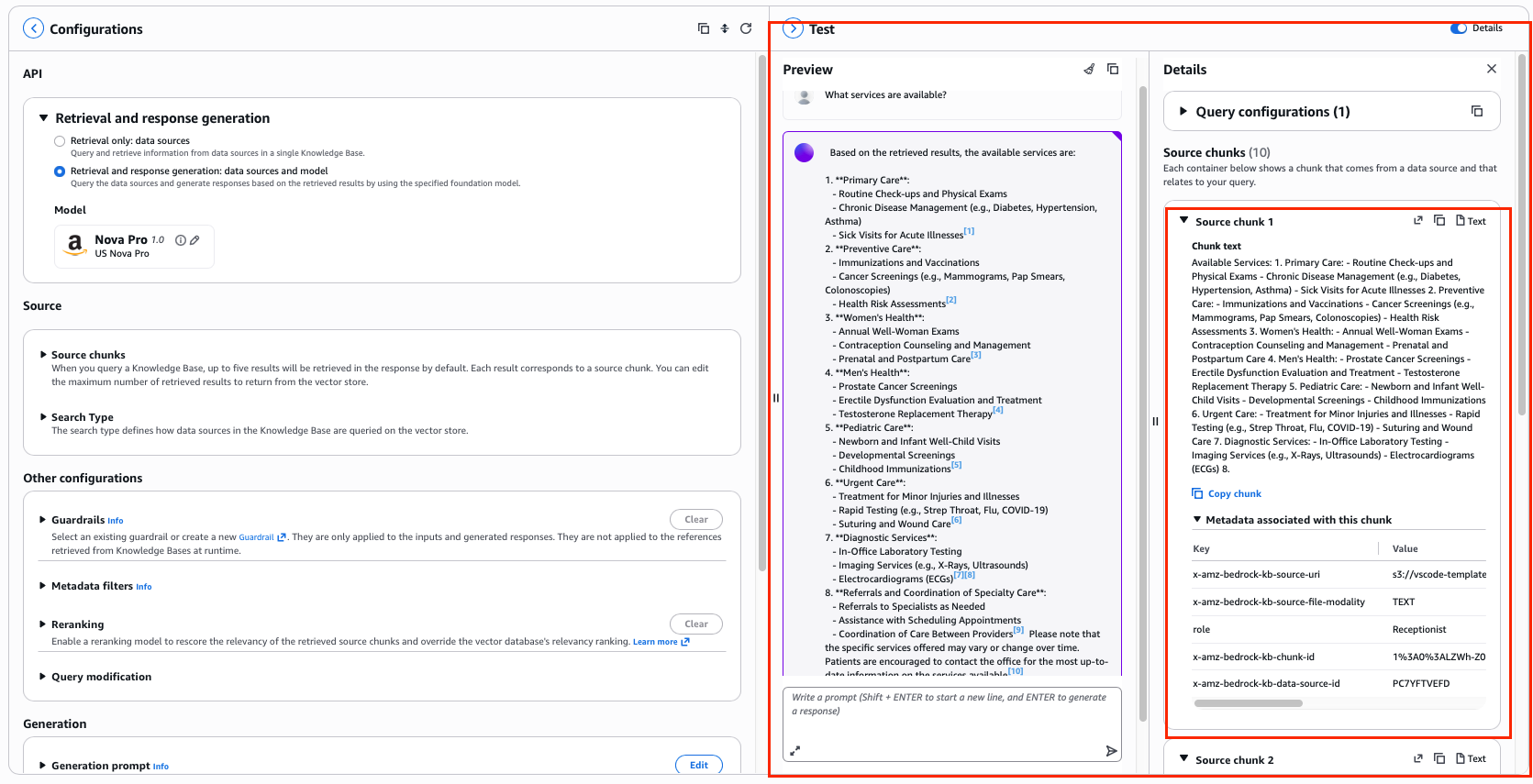
The response should reflect the content of the documents you synced. I can also see exactly where the data came from - the source citations that appear alongside the response show which document and section the model pulled from. This traceability is one of the underrated benefits of RAG. You are not just getting an answer - you can see where it came from.
The server is running on an EC2 instance. The application is a Python script using Streamlit as the web interface, accessed via a browser.
In Part 2, we get into the first threat category: insecure plugins how misconfigured integrations get exploited, and how to stop it.
Each part contains sections that align with the NIST CyberSecurity Framework (CSF) to help demonstrate which controls can be used in the four functions of the CSF (Identify, Detect, Prevent, Respond).
References:
Amazon Bedrock Amazon Bedrock Agents Amazon Bedrock Knowledge Bases Amazon Bedrock GuardrailsAWS Lambda Streamlit NIST Cybersecurity Framework OWASP Top 10 for LLM Applications
Have blog ideas, want to engage on a topic, or explore collaboration? Let’s take it offline reach out on LinkedIn. I’d love to connect and continue the conversation!